Developer Guide
- Acknowledgements
- Setting up, getting started
- Design
- Implementation
- Documentation, logging, testing, configuration, dev-ops
- Appendix: Requirements
- Appendix: Instructions for manual testing
- Appendix: Planned Enhancements
Acknowledgements
- {list here sources of all reused/adapted ideas, code, documentation, and third-party libraries – include links to the original source as well}
Setting up, getting started
Refer to the guide Setting up and getting started.
Design
 Tip: The
 .puml files used to create diagrams in this document docs/diagrams folder. Refer to the PlantUML Tutorial at se-edu/guides to learn how to create and edit diagrams.
Architecture
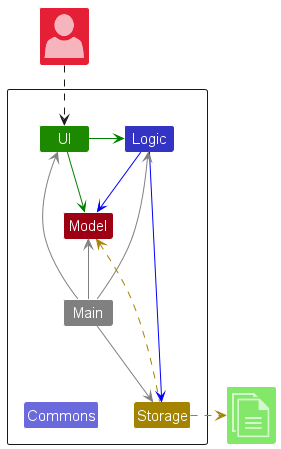
The Architecture Diagram given above explains the high-level design of the App.
Given below is a quick overview of main components and how they interact with each other.
Main components of the architecture
Main (consisting of classes Main and MainApp) is in charge of the app launch and shut down.
- At app launch, it initializes the other components in the correct sequence, and connects them up with each other.
- At shut down, it shuts down the other components and invokes cleanup methods where necessary.
The bulk of the app’s work is done by the following four components:
-
UI: The UI of the App. -
Logic: The command executor. -
Model: Holds the data of the App in memory. -
Storage: Reads data from, and writes data to, the hard disk.
Commons represents a collection of classes used by multiple other components.
How the architecture components interact with each other
The Sequence Diagram below shows how the components interact with each other for the scenario where the user issues the command delete Alice.
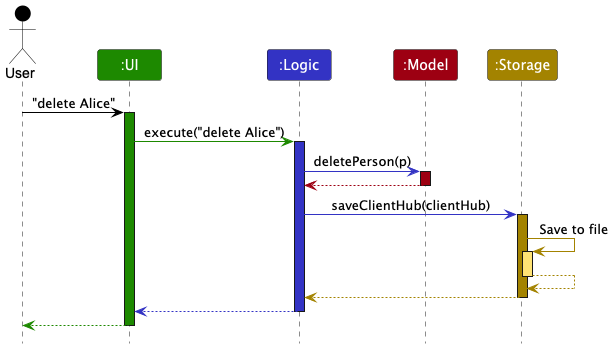
Each of the four main components (also shown in the diagram above),
- defines its API in an
interfacewith the same name as the Component. - implements its functionality using a concrete
{Component Name}Managerclass (which follows the corresponding APIinterfacementioned in the previous point.)
For example, the Logic component defines its API in the Logic.java interface and implements its functionality using the LogicManager.java class which follows the Logic interface. Other components interact with a given component through its interface rather than the concrete class (reason: to prevent outside component’s being coupled to the implementation of a component), as illustrated in the (partial) class diagram below.
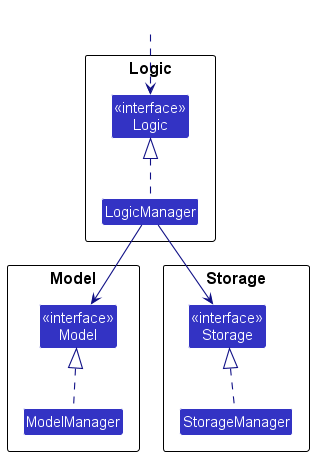
The sections below give more details of each component.
UI component
The API of this component is specified in Ui.java
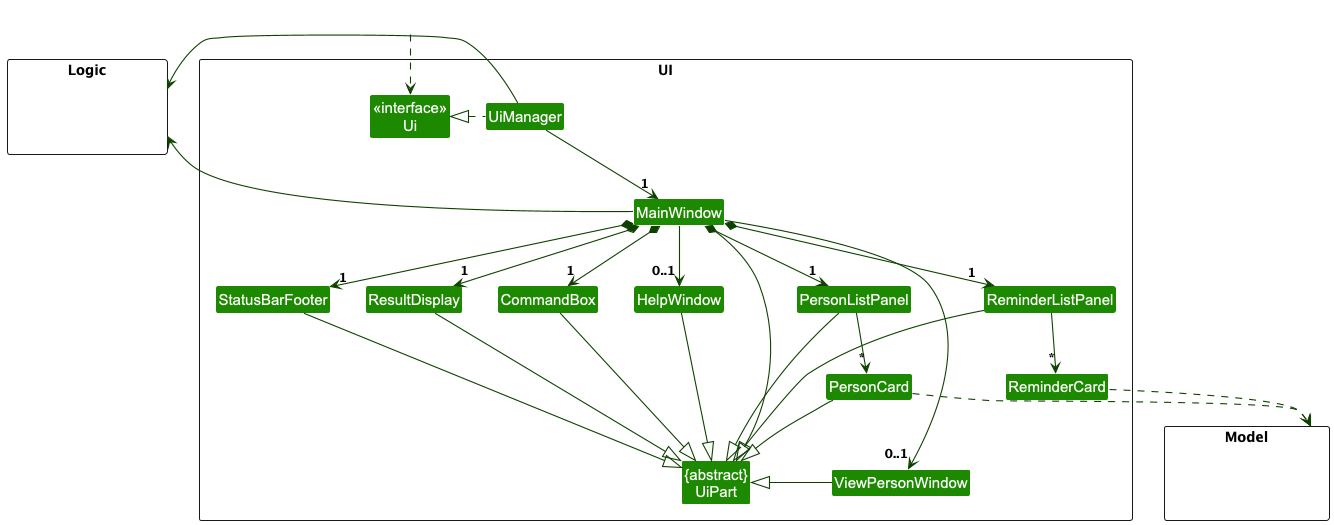
The UI consists of a MainWindow that is made up of parts e.g.CommandBox, ResultDisplay, PersonListPanel, StatusBarFooter etc. All these, including the MainWindow, inherit from the abstract UiPart class which captures the commonalities between classes that represent parts of the visible GUI.
The UI component uses the JavaFx UI framework. The layout of these UI parts are defined in matching .fxml files that are in the src/main/resources/view folder. For example, the layout of the MainWindow is specified in MainWindow.fxml
The UI component,
- executes user commands using the
Logiccomponent. - listens for changes to
Modeldata so that the UI can be updated with the modified data. - keeps a reference to the
Logiccomponent, because theUIrelies on theLogicto execute commands. - depends on some classes in the
Modelcomponent, as it displaysPersonandReminderobject residing in theModel. (For e.g.PersonListPanel,PersonCard,ReminderListPanel,ReminderCard)
Logic component
API : Logic.java
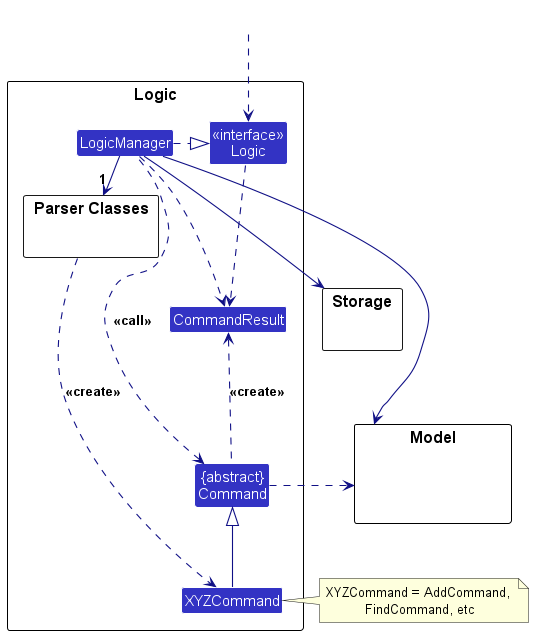
Here’s a (partial) class diagram of the Logic component:
The sequence diagram below illustrates the interactions within the Logic component, taking execute("delete Alice") API call as an example.
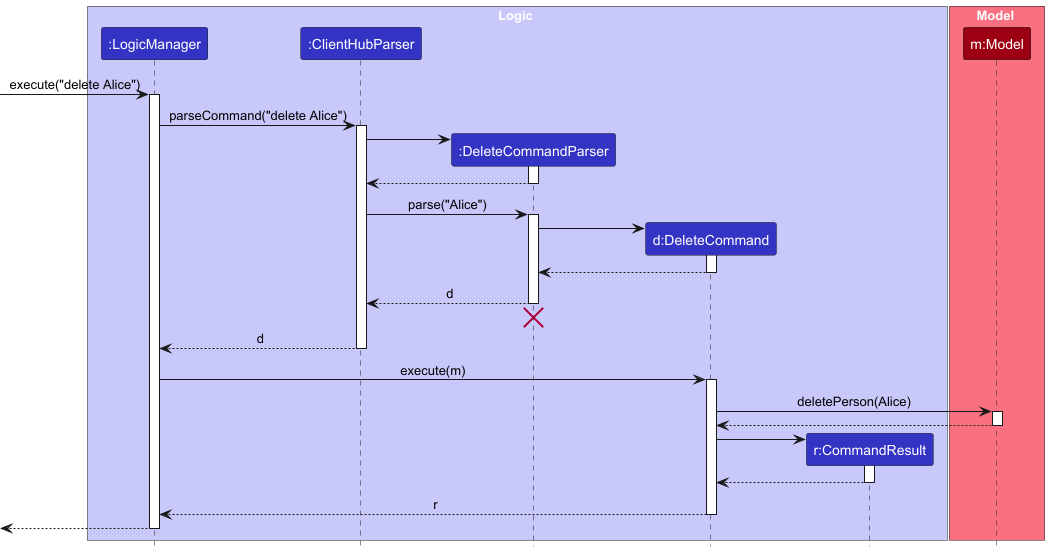
 Note: The lifeline for
 DeleteCommandParser should end at the destroy marker (X) but due to a limitation of PlantUML, the lifeline continues till the end of diagram.
How the Logic component works:
- When
Logicis called upon to execute a command, it is passed to anClientHubParserobject which in turn creates a parser that matches the command (e.g.,DeleteCommandParser) and uses it to parse the command. - This results in a
Commandobject (more precisely, an object of one of its subclasses e.g.,DeleteCommand) which is executed by theLogicManager. - The command can communicate with the
Modelwhen it is executed (e.g. to delete a person).
Note that although this is shown as a single step in the diagram above (for simplicity), in the code it can take several interactions (between the command object and theModel) to achieve. - The result of the command execution is encapsulated as a
CommandResultobject which is returned back fromLogic.
Here are the other classes in Logic (omitted from the class diagram above) that are used for parsing a user command:
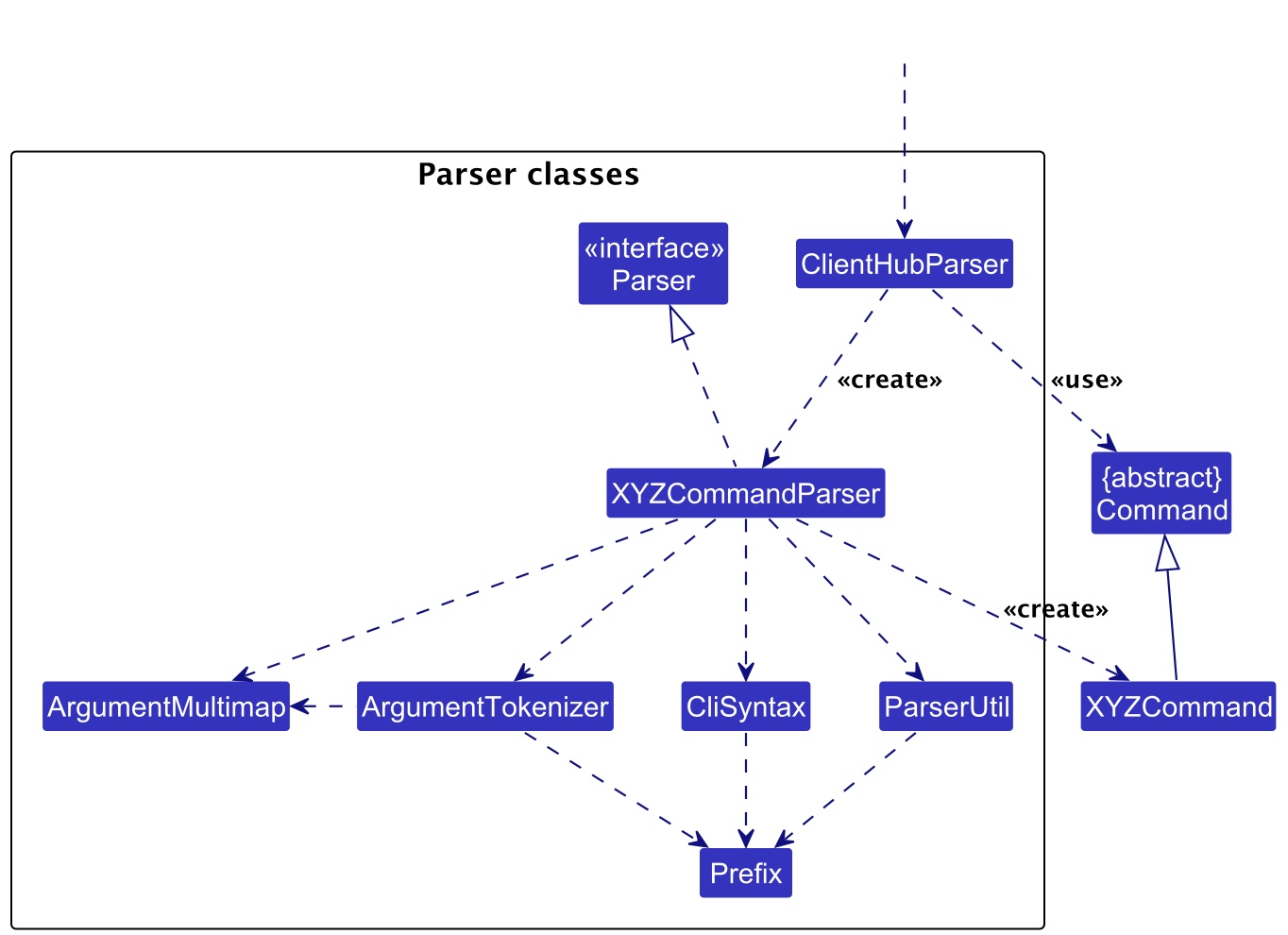
How the parsing works:
- When called upon to parse a user command, the
ClientHubParserclass creates anXYZCommandParser(XYZis a placeholder for the specific command name e.g.,AddCommandParser) which uses the other classes shown above to parse the user command and create aXYZCommandobject (e.g.,AddCommand) which theAddressBookParserreturns back as aCommandobject. - All
XYZCommandParserclasses (e.g.,AddCommandParser,DeleteCommandParser, …) inherit from theParserinterface so that they can be treated similarly where possible e.g, during testing.
Model component
API : Model.java
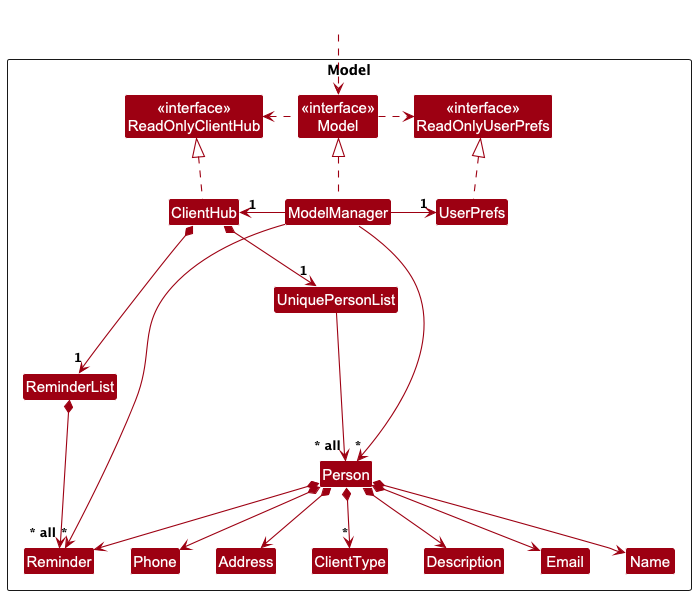
The Model component,
- stores the client hub data i.e., all
Personobjects (which are contained in aUniquePersonListobject) and all Reminders(which are contained in a ReminderList object). - stores the currently ‘selected’
Personobjects (e.g., results of a search query) as a separate sorted list composed using a filtered list which is exposed to outsiders as an unmodifiableObservableList<Person>that can be ‘observed’ e.g. the UI can be bound to this list so that the UI automatically updates when the data in the list change. - stores a
UserPrefobject that represents the user’s preferences. This is exposed to the outside as aReadOnlyUserPrefobjects. - does not depend on any of the other three components (as the
Modelrepresents data entities of the domain, they should make sense on their own without depending on other components)
Note: An alternative (arguably, a more OOP) model is given below. It has a Client Type list in the ClientHub, which Person references. This allows ClientHub to only require one ClientType object per unique client type, instead of each Person needing their own ClientType objects.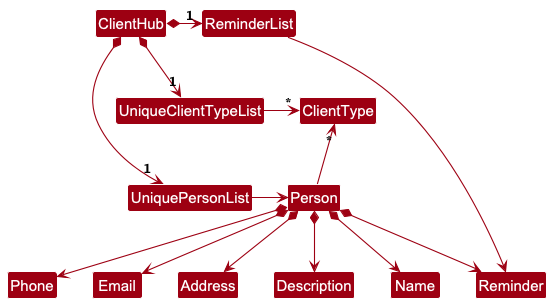
Storage component
API : Storage.java
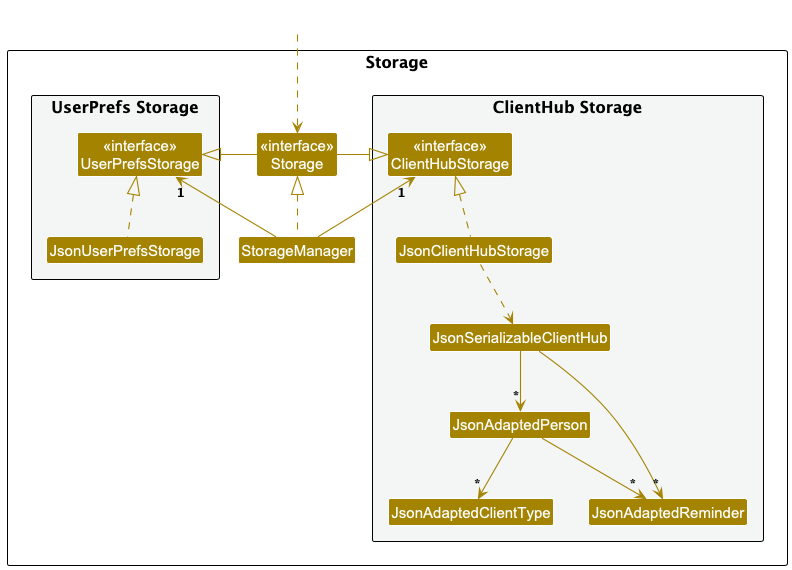
The Storage component,
- can save both ClientHub data and user preference data in JSON format, and read them back into corresponding objects.
- inherits from both
ClientHubStorageandUserPrefStorage, which means it can be treated as either one (if only the functionality of only one is needed). - depends on some classes in the
Modelcomponent (because theStoragecomponent’s job is to save/retrieve objects that belong to theModel)
Common classes
Classes used by multiple components are in the seedu.address.commons package.
Implementation
This section describes some noteworthy details on how certain features are implemented.
Add Reminder Feature
Implementation
The add reminder mechanism is done by altering the ReminderList which is
facilitated by ClientHub class. Additionally , ClientHub also implements
the following operations:
-
ClientHub#editReminder()- Edits the reminder in the reminder list. -
ClientHub#deleteReminder()- Deletes the reminder from the reminder list.
Given below is an example usage scenario and how the add reminder mechanism behaves at each step.
Step 1. The user launches the application for the first time. The ClientHub will be initialized with an empty reminder list and an initial.
Client list.
Step 2. The user finds a client in the client list to add a reminder for e.g. Alice Pauline. The
User will then execute radd n/Alice Pauline dt/2022-10-10 12:00 d/lunch command to add a reminder for Alice Pauline.
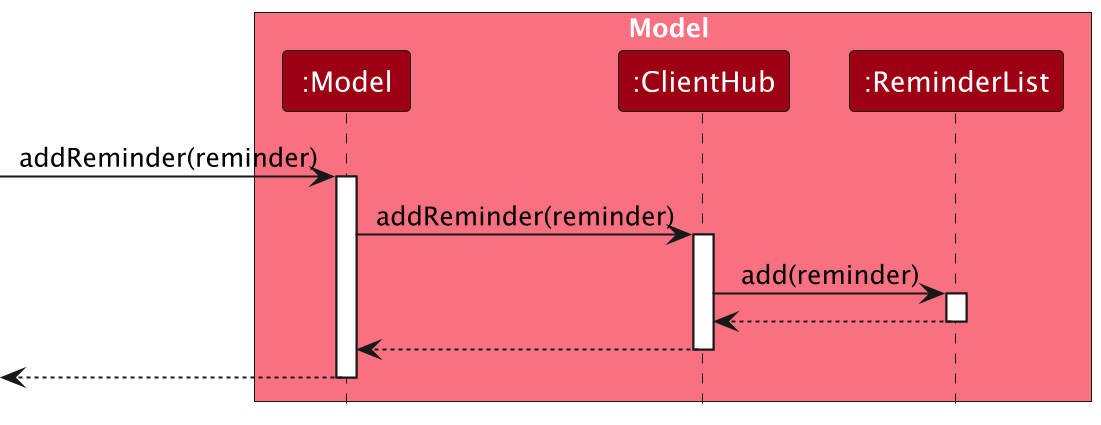
The radd command calls ClientHub#addReminder(), causing the reminder to be added to the reminder list.
The following sequence diagram shows how an add reminder operation goes through the Logic component:
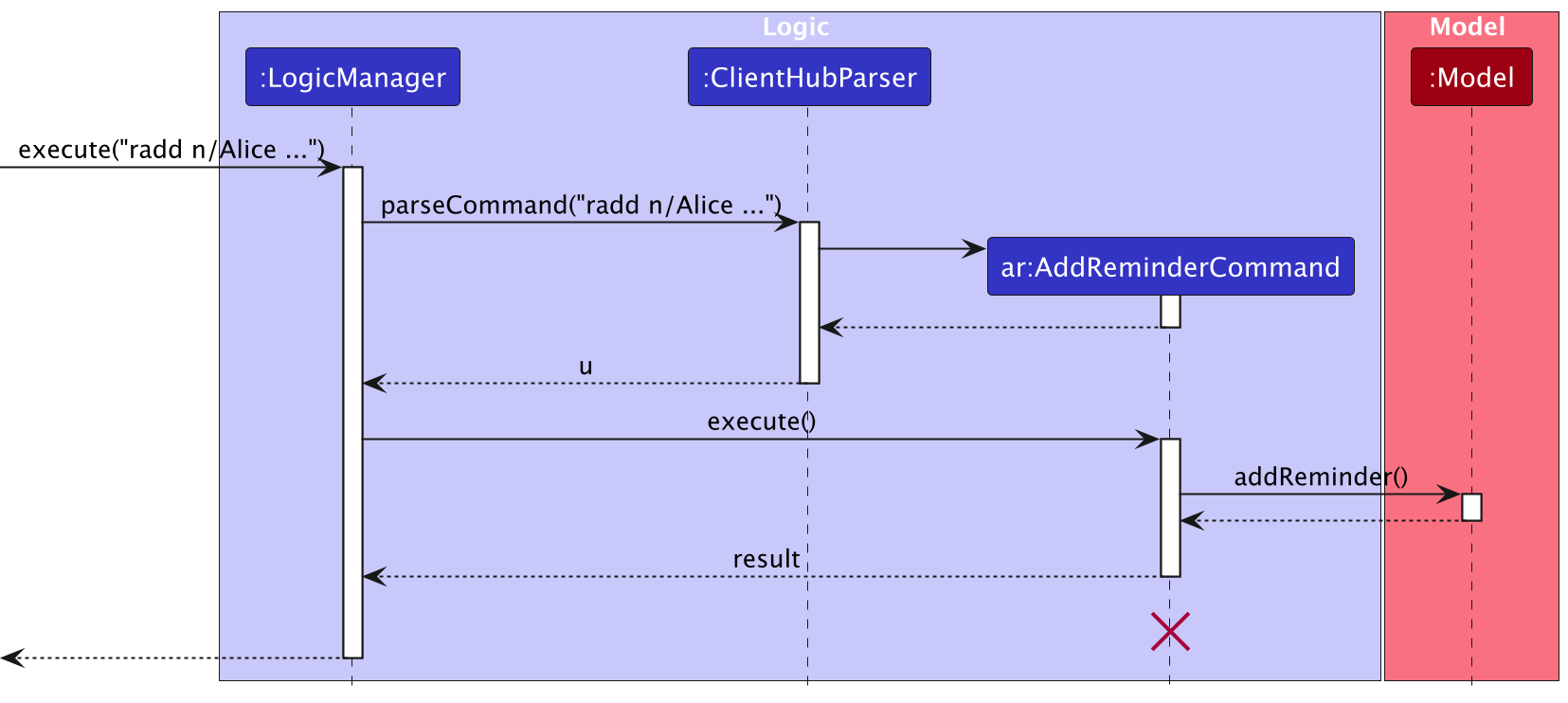
Similarly, how an add reminder operation goes through the Model component is shown below:
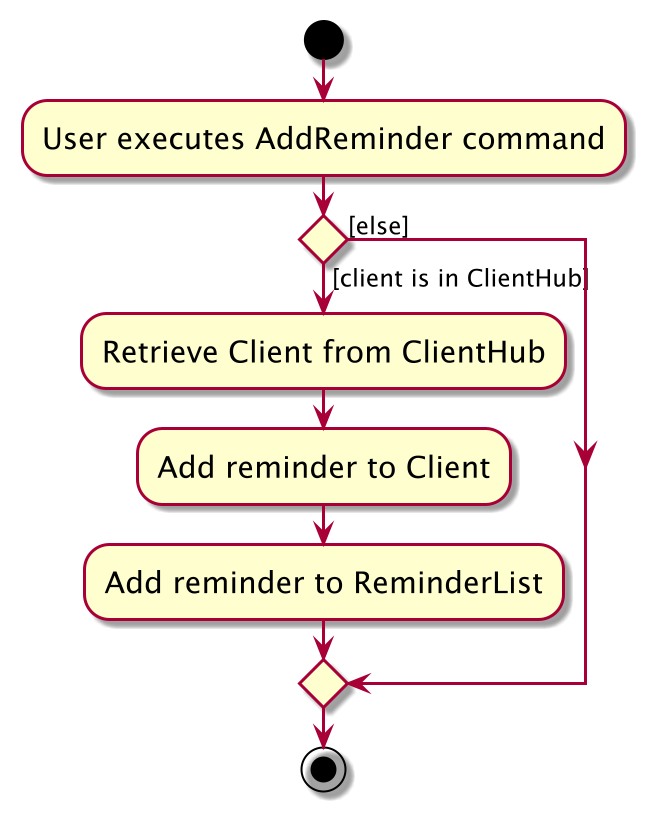
The following activity diagram summarizes what happens when a user executes an add reminder command:
Documentation, logging, testing, configuration, dev-ops
Appendix: Requirements
Product scope
Target user profile:
- Tech-savvy Independent Financial Advisors who manage more than 50 clients.
- Have a need to efficiently manage a large volume of client details, such as insurance policies and financial plans.
- Prefer desktop apps over other types of interfaces for their daily work.
- Can type quickly and are comfortable using CLI applications, favoring typing over mouse-based interactions for efficiency.
- Require a simple and streamlined tool that makes it easy to access and track client information with minimal clicks.
- Value simplicity and efficiency in their tools to save time and focus on client relationships.
- Need a system that provides quick access to relevant client information, including financial plans, policy expiration dates, and client details.
- Often handle tasks that involve tracking insurance policies, renewals, and financial documents.
Value proposition: Our product provides independent financial advisors with a streamlined tool to manage client details (e.g. Track insurance policies) as well as create reminders for meet ups with them. Optimized for simplicity and efficiency, this product makes the lives of financial advisors easier by offering easier access to relevant information of their clients and important dates their clients.
User stories
Priorities: High (must have) - * * *, Medium (nice to have) - * *, Low (unlikely to have) - *
| Priority | As a … | I want to … | So that I can… |
|---|---|---|---|
* * * |
financial advisor | add a new client’s client details | easily manage my client base |
* * * |
financial advisor | view all of a client’s details on one screen | have all necessary information in one place. |
* * * |
financial advisor | delete outdated client client information | keep my database clean and relevant |
* * |
financial advisor | search for a client by their personal information, such as name or phone number | ensure that I always have the latest details |
* * |
financial advisor | sort all clients in alphabetical order based on their names | prioritize my communication with them |
* |
financial advisor | update a client’s client information | ensure that I always have the latest details |
* |
financial advisor | tag clients with specific client types (e.g., investor, retiree) | segment them for different services |
* |
financial advisor | add description to a client’s profile | track important interactions or discussions |
* |
financial advisor | assign reminders to each client (e.g., “Review investment portfolio”) | stay organized and focused |
{More to be added}
Use cases
(For all use cases below, the System is the ClientHub and the Actor is the user, unless specified otherwise)
Use case: Add a new client
MSS
- User inputs the command to add a client’s client
- ClientHub adds the new client to the list of clients
-
ClientHub shows successful output message
Use case ends.
Extensions
- 1a. ClientHub detects invalid input format
- 1a1. ClientHub shows an error message and shows the correct format for the wrong input Step 1 is repeated until user inputs the correct format.
-
1b. ClientHub detects missing fields
-
1b1. ClientHub shows an error message informing user that required field(s) are missing
Step 1 is repeated until user inputs all required fields.
-
-
1c. ClientHub detects a multiple clients match the same name
-
1c1. ClientHub informs user that more than one client matches the same name and prompt the user to input a different name.
Step 1 is repeated until user inputs a unique name.
-
Use case: Delete a client
MSS
- User keys in the command to delete a client
- ClientHub deletes the person
-
ClientHub shows successful output message
Use case ends.
Extensions
-
1a. ClientHub detects invalid input format
-
1a1. ClientHub shows an error message that the input is in the wrong format
Step 1 is repeated until user inputs the correct format.
-
-
1b. ClientHub detects that the given name is not in the list
-
1b1. ClientHub shows an error message that the name is not in the list
Use case ends.
-
-
1c. ClientHub detects multiple clients match the same name
-
1c1. ClientHub informs the user that multiple clients match the same name and requests the user to input a more specific name of the client
Step 1 is repeated until user inputs a more specific name that only one client matches.
-
Use case: List clients
MSS
- User requests to list all clients
- ClientHub shows the list of all clients saved
Extensions
- 1a. ClientHub detects unknown command
-
1a1. ClientHub shows an error message that the command is not recognized
Use case ends.
-
Use case: Search for a client
MSS
- User inputs the command to search for a client
- ClientHub searches for the client
-
ClientHub shows the client details
Use case ends.
Extensions
- 1a. ClientHub detects invalid input format
-
1a1. ClientHub shows an error message that the input is in the wrong format
Step 1 is repeated until user inputs the correct format.
-
- 1b. ClientHub detects that the given name is not in the list
-
1b1. ClientHub shows an error message that the name is not in the list
Use case ends.
-
Use case: Edit a client
MSS
- User inputs the command to edit a client’s contact details
- ClientHub edits the client details
-
ClientHub shows successful output message
Use case ends.
Extensions
- 1a. ClientHub detects invalid input format
-
1a1. ClientHub shows an error message that the input is in the wrong format
Step 1 is repeated until user inputs the correct format.
-
- 1b. ClientHub detects that the given name is not in the list
-
1b1. ClientHub shows an error message that the name is not in the list
Use case ends.
-
- 1c. ClientHub detects multiple clients match the same name
-
1c1. ClientHub informs the user that multiple clients matches the same name and requests the user to input a more specific name of the client
Step 1 is repeated until user inputs a more specific name that only one client matches.
-
Use case: Sort clients
MSS
- User inputs the command to sort clients
- ClientHub sorts the clients in alphabetical order based on their names
-
ClientHub shows the sorted list of clients
Use case ends.
Extensions
- 1a. ClientHub detects unknown command
-
1a1. ClientHub shows an error message that the command is not recognized
Use case ends.
-
- 1b. ClientHub detects invalid input format
-
1b1. ClientHub shows an error message that the input is in the wrong format
Step 1 is repeated until user inputs the correct format.
-
Use case: View
MSS
- User inputs the command to view a client’s details
-
ClientHub shows the client’s details
Use case ends.
Extensions
- 1a. ClientHub detects invalid input format
-
1a1. ClientHub shows an error message that the input is in the wrong format
Step 1 is repeated until user inputs the correct format.
-
- 1b. ClientHub detects that the given name is not in the list
-
1b1. ClientHub shows an error message that the name is not in the list
Use case ends.
-
- 1c. ClientHub detects multiple clients match the same name
-
1c1. ClientHub informs the user that multiple clients match the same name and requests the user to input a more specific name of the client
Step 1 is repeated until user inputs a more specific name that only one client matches.
-
Use case: Add reminder
MSS
- User inputs the command to add a reminder
- ClientHub adds the reminder to the client
- ClientHub shows successful output message Use case ends.
Extensions
- 1a. ClientHub detects invalid input format
-
1a1. ClientHub shows an error message that the input is in the wrong format
Step 1 is repeated until user inputs the correct format.
-
- 1b. ClientHub detects that the given name is not in the list
-
1b1. ClientHub shows an error message that the name is not in the list
Use case ends.
-
- 1c. ClientHub detects multiple clients match the same name
-
1c1. ClientHub informs the user that multiple clients match the same name and requests the user to input a specific name of the client
Step 1 is repeated until user inputs a more specific name that only one client matches.
-
Use case: Delete reminder
MSS
- User inputs the command to delete a reminder
- ClientHub deletes the reminder from the client
- ClientHub shows successful output message Use case ends.
Extensions
- 1a. ClientHub detects invalid input format
-
1a1. ClientHub shows an error message that the input is in the wrong format
Step 1 is repeated until user inputs the correct format.
-
- 1b. ClientHub detects the given index is out of range
-
1b1. ClientHub shows an error message that the index is out of range
Step 1 is repeated until user inputs a valid index.
-
Use case: Edit reminder
MSS
- User inputs the command to edit a reminder
- ClientHub edits the reminder
- ClientHub shows successful output message Use case ends.
Extensions
- 1a. ClientHub detects invalid input format
-
1a1. ClientHub shows an error message that the input is in the wrong format
Step 1 is repeated until user inputs the correct format.
-
- 1b. ClientHub detects the given index is out of range
-
1b1. ClientHub shows an error message that the index is out of range
Step 1 is repeated until user inputs a valid index.
-
Non-Functional Requirements
- Should work on any mainstream OS as long as it has Java
17or above installed. - Should be able to hold up to 1000 clients without a noticeable sluggishness in performance for typical usage.
- Should be able to load client’s client within 2 seconds to provide a smooth user experience.
- As the number of clients increases, the app should be able to handle the increased data load without significant degradation in performance.
- A financial advisor with above average typing speed for regular English text (i.e. not code, not system admin commands) should be able to accomplish most of the tasks faster using commands than using the mouse.
- The application should have an intuitive and easy-to-navigate UI so that financial advisors can quickly find clients and input data without much training.
- The system should be designed to easily accommodate new features or updates.
Glossary
- Mainstream OS: Windows, Linux, Unix, macOS
- Private client Detail: A client detail that is not meant to be shared with others
- Client: A person or company that is in the client list
- Client Type: A category used to describe the relationship or status of a client, such as VIP and standard.
- client: A client’s information saved in the system, which includes details such as name, phone number, email, address, client type, and descriptions.
- Financial Advisor: The primary user of ClientHub, responsible for managing a large number of clients and using the system to track details, tasks, and interactions with clients.
Appendix: Instructions for manual testing
Given below are instructions to test the app manually.
Note: These instructions only provide a starting point for testers to work on;
testers are expected to do more exploratory testing.
Launch and shutdown
1. Initial launch
-
For Mac
- Download the jar file and copy into an empty folder called
ClientHubinDownloads. - Open Terminal
- Inside the terminal enter:
cd Downloads/ClientHub - Then enter:
java -jar clienthub.jar- Expected: Shows the GUI with a set of sample clients.
- The window size may not be optimum.
- Download the jar file and copy into an empty folder called
-
For Windows
- Download the jar file and copy into an empty folder called
ClientHubinDownloads. - Open PowerShell
- Inside the Command Prompt enter:
cd Downloads/ClientHub - Then enter:
java -jar clienthub.jar- Expected: Shows the GUI with a set of sample clients.
- The window size may not be optimum.
- Download the jar file and copy into an empty folder called
2. Saving window preferences
- Resize the window to an optimum size. Move the window to a different location. Close the window.
- Re-launch the app by double-clicking the jar file.
Expected: The most recent window size and location is retained.
Deleting a contact
-
Deleting a client while all clients are being shown
-
Prerequisites: List all clients using the
listcommand. Multiple clients in the list. -
Test case:
delete Ahmad
Expected: Contact with name “Ahmad” is deleted. Details of the deleted client shown in the status message. Timestamp in the status bar is updated. -
Test case:
delete x(where x is a number)
Expected: No client is deleted. Error details shown in the status message. Status bar remains the same. -
Other incorrect delete commands to try:
deletedelete [NAME](with a client not in the list)
Expected: Similar to previous.
-
-
Deleting a client with the same name
- Test case:
delete Jeremywith more than one client with the nameJeremy
Expected: User is prompted to be more specific. Details of the required change are shown in the status message. Status bar remains the same.
- Test case:
Saving data
- Checking if changes in data are saved
- Use any of the data changing commands e.g.
adddeleteedit. - Exit ClientHub with
exitor closing the window. - Re-launch the app by double-clicking the jar file.
Expected: Changes made previously are loaded into the displayed data
- Use any of the data changing commands e.g.
Appendix: Planned Enhancements
Team size: 5
Given below are some planned future enhancements for the app.
-
Make Find Stackable: The current find does not stack on top of each other. We plan to make it able to stack. For example, doing a
find n/Aliceinto afind p/9874will first find all clients that have the nameAliceand then find the clients in this filtered list that have a phone number with9874. -
Disallow Duplicate Phone Numbers: Currently, the app allows the user to add clients with the same phone number which generally does not occur, thus we plan to make the app disallow adding clients with the same phone number, which will prevent any accidental additions of clients with the same phone number.
-
Allow Phone Numbers of different lengths: Currently, the app only allows phone numbers of 8 for Singaporean Phone numbers, we plan to make the app able to take in Numbers from other countries such as Malaysia to accommodate to FAs that have clients outside of Singapore
-
More flexible Add: Currently, the app requires the user to input all fields when adding a client, we plan to make the app more flexible by allowing the user to input only the necessary fields when adding a client. Certain fields such as Description and Address may be unnecessary for some FAs to keep track of. So to increase their efficiency, we plan to make the app allow the user to input only the necessary fields when adding a client such as Name, Phone Number and Client Type.
-
All for more flexible Reminder Editing: Currently, the app only allows the user to edit the name of a person if they have no reminders, this is quite restrictive and may cause some inconveniences for users. Thus, we plan to make the app allow the user to edit the name of a person even if they have reminders. This will allow the user to make changes to the client’s name without having to delete all the reminders first.
-
Improved display message for duplicate reminders: Currently, the app displays a successful message when the user add a reminder that already exists, but it doesn’t actually add the reminder to the reminder list. This may cause some inconveniences for the user as they may not be aware that they have added a duplicate reminder. Thus, we plan to make the app provide a specific display message when the user tries to add a reminder that already exists.
-
Optimised Exit: Currently, the app does not hide all
viewpopups when user exits the app. This may cause some confusion for the user when the user exits the app as they would expect all modals and popups to close as well when they exit the app. Thus, we plan to make the app hide allviewpopups when the user exits the app. -
More restrictive Clear: Currently, the app allows the user to clear all clients and reminders without any confirmation, this may cause some inconveniences for the user if they accidentally clear all clients and reminders. Thus, we plan to make the app require the user to confirm before clearing all clients and reminders.
-
Add visual warnings to past dates for reminders: Currently, the app does not provide any visual warnings for reminders that are added with dates past the current date. This may cause some inconveniences for the user as they may not be aware that they have added reminders with past dates. Thus, we plan to make the app provide visual warnings for reminders that are added with dates past the current date.
-
Add more intuitive error message for the add reminder feature: Currently, the app only provides a general error message. This may cause some inconveniences for the user as they may not be aware of what went wrong. Thus, we plan to make the app provide more intuitive error messages for the add reminder feature. For example, if the user tries to add a reminder but forgot to pass in a
DATETIME, the app will provide an error saying that the user is missing theDATETIMEfield.